

Everything the person running it is currently holding in their head
The hard part of group golf was never the golf. It is the roster, the pairings, the changes and the chasing. This is the part of TrophyRoom built for whoever ends up doing that.
From an idea to a real event
Nothing has to be right first time. The details, the roster and the format can be edited after setup.
Events and seasons
Create a single event for one trip or tournament, or a season that holds a whole year of them. Neither needs the other, and an event can join a season later.
Rounds and formats
Lay out the rounds, the courses and how each one is played. Match play, stroke play, four-ball, scramble, stableford, skins and more sit alongside each other in the same event.
Handicaps and allocation
Strokes are allocated against the format and the tees actually being played, so the match is fair before anyone argues about it.
Courses and tees
Pick a course, pick the tees, and the card, the stroke index and the yardages come with it.
Getting everyone in, and into the right side
Invitations, teams, pairings and the small amount of authority you hand to other people.
Invitations and join codes
Invite people directly, or hand out a code. Either route lands them on the event itself rather than on a sign-up maze, and codes can be retired when you are done with them.
The roster
See who is in, who has not answered and who still needs something from you — in one list, not across four threads.
Teams and drafts
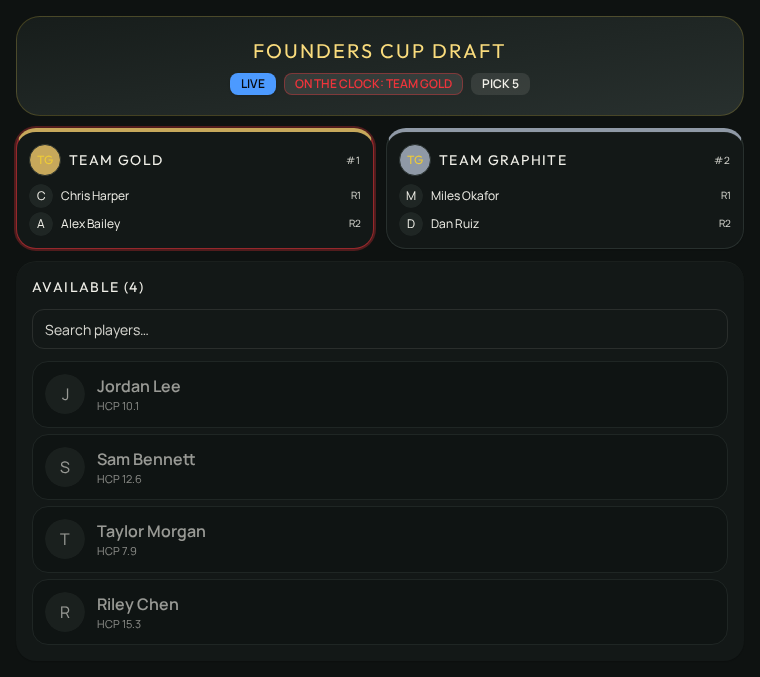
Build sides by hand, or run an actual draft with picks and an order. The result becomes the teams everyone plays under.
Pairings
Set the groupings for each round and change them when the weather or the roster changes. Everyone sees the current version, not last night's.
Captains and helpers
Hand part of the job to someone else without handing over the whole thing. Permission is scoped to what they actually need.
Announcements
Post it once to the event itself, where everyone playing can find it, instead of a group chat half of them muted. You can see who has read it.
Running it without running it
The parts that do not need a human stop needing one.
What still needs a decision
The organizing view is built around the outstanding decision, not around a table of everything. It surfaces the thing you were about to go looking for.
Approvals and corrections
Score corrections, handicap reviews and registration questions arrive as something to settle, with the history of how they were settled.
You do not have to play
An organizer can run the whole thing without entering a single score, and a player never has to take on any of the administration.
Rules and the event guide
Write the local rules and the running order once, and let people read them without asking you.
Set up the next one in the browser
Creating an event takes an account. It does not take a handicap, a home course or a finished golfer profile.